
Digital Seating Chart Kiosk: How It Works and Why Guests Love It
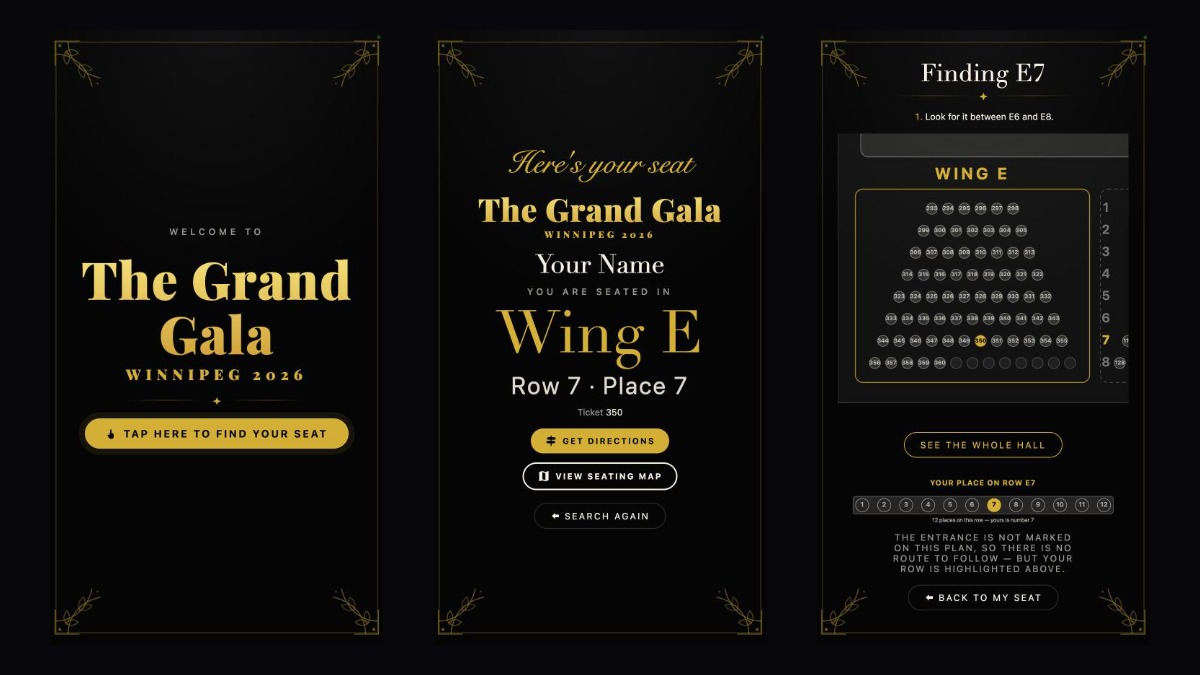
First impressions start at the door. At a gala, wedding, theatre show or conference, the moment guests arrive they want one answer: where am I sitting? A paper seating chart creates a crowd, slows down arrivals and is out of date the moment one name changes. Media Vaccine’s digital seating chart kiosk replaces the poster board with a branded touchscreen that guides every guest to their exact seat in seconds. Here is how it works, step by step, and why it delivers the ultimate guest experience at events in Winnipeg.
What is a digital seating chart kiosk?
A digital seating chart kiosk is a touchscreen display at the entrance of your venue. Guests type their name and the screen shows their table or seat, plus a map of where to find it. Digital seating charts are one of the biggest wedding and event trends of 2026, and our kiosk takes the idea further with live search, step-by-step directions and full event branding.
How it works for your guests
Step 1: A welcome screen branded to your event
The kiosk greets guests with your event name, colours and style, so it feels like part of the decor, not a piece of tech. One clear button invites them to find their seat.
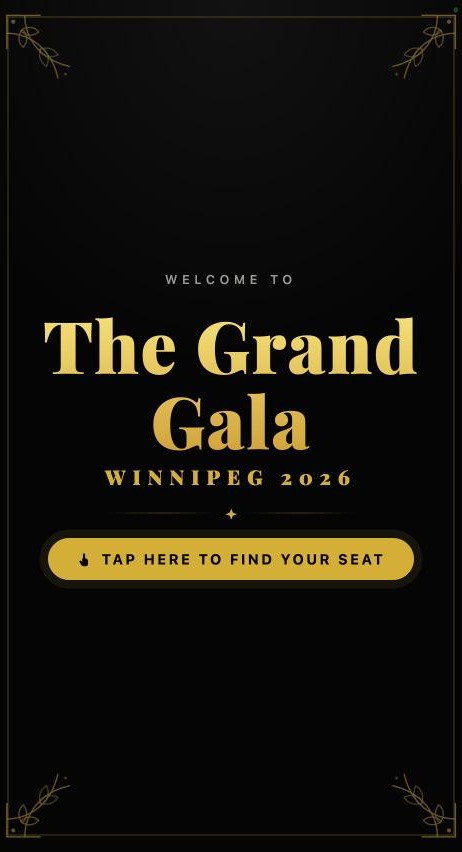
Step 2: Search by name with a simple on-screen keyboard
Guests tap the large, easy keyboard and start typing. Matching names appear instantly after the first letter or two, so most people find themselves in a couple of taps. It is simple enough for guests of every age.
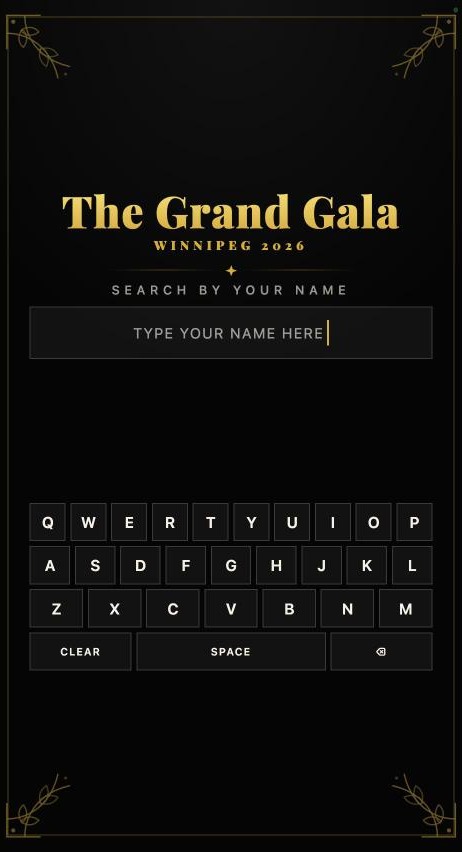
Step 3: “Here’s your seat”
The guest taps their name and the kiosk shows exactly where they are seated: section, row, seat number and even their ticket number. For banquet events, it shows the table.
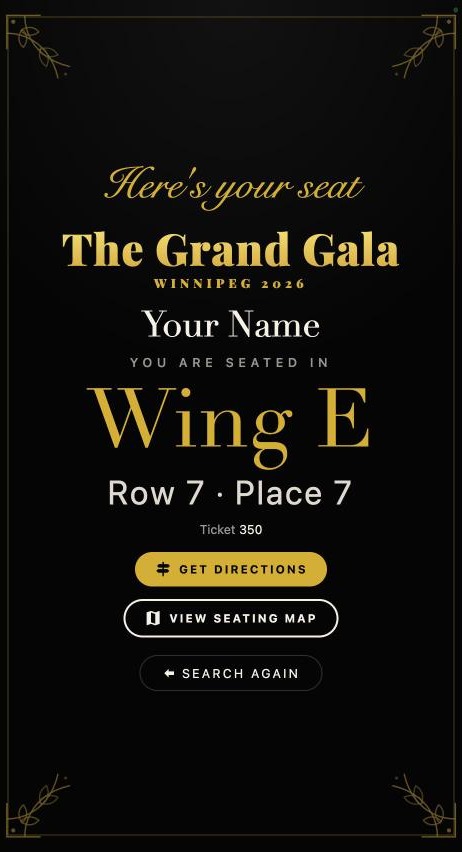
Step 4: Directions and an interactive seating map
Guests can tap Get Directions or View Seating Map. The kiosk highlights their seat on the floor plan, zooms into their part of the room, shows which seats are on either side and where their place is along the row. Nobody has to wander the aisles or ask an usher.
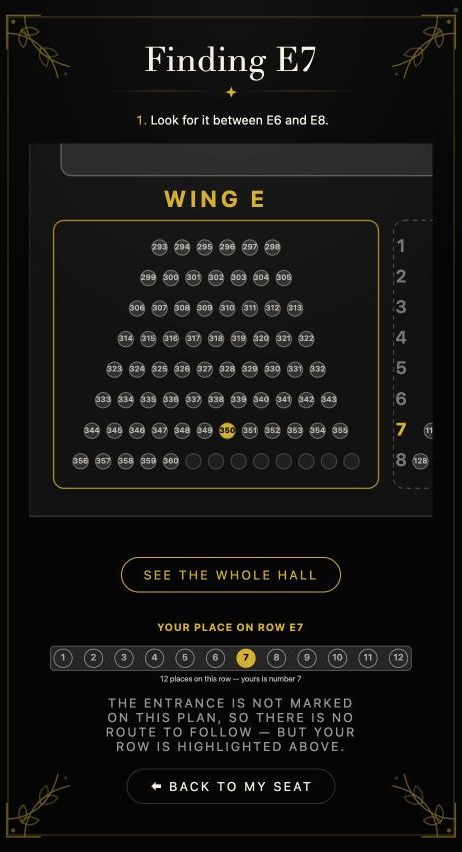
Step 5: Ready for the next guest
With one tap on Search Again, the kiosk returns to the welcome screen for the next guest.
All we need from you: your guest list
Setting up is easy. Send us your guest or attendee list with their table or seat assignments, and Media Vaccine does the rest:
- We design the kiosk with your event name, colours and theme.
- We build your floor plan, whether it is banquet tables or theatre-style rows and sections.
- We load your guest list and test every name.
- We set up the touchscreen at your venue and support it during the event.
Late changes are simple: we update the list in the system, with no reprinting.
Benefits of a digital seating chart for events
- No crowding at the entrance: guests find their seat in seconds instead of searching a long printed list.
- A premium first impression: a branded, elegant screen sets the tone for the whole event.
- Accurate to the last minute: guest or seating changes are updated instantly.
- Less pressure on staff and ushers: volunteers can welcome guests instead of answering “where am I sitting?”
- Works for any layout: banquet tables for weddings and galas, or rows and sections for theatre, church and conference seating.
- Easy for everyone: large text, a simple keyboard and clear directions work for guests of all ages.
- More sustainable: no large printed boards thrown away after one night.
- Programs start on time: faster seating means fewer delays.
Perfect for
- Weddings and anniversaries
- Galas, award nights and fundraising dinners
- Theatre productions, film premieres and concerts
- Conferences, AGMs and corporate events
- Church, cultural and community celebrations
More than seating: complete event screens
The same screens can show welcome messages, slideshows, sponsor loops and live video. Learn more about our digital signage for events, and pair your kiosk with live streaming, photography and videography and printed event branding for a seamless experience.
Frequently asked questions
How does a digital seating chart work?
We load your guest list and seating plan into the kiosk. At the event, guests type their name on the touchscreen and instantly see their table or seat, with a map showing where to go.
What do I need to provide?
Just your guest list with each person’s table or seat. We handle the design, floor plan, setup and support.
Can the kiosk match my event theme?
Yes. Every kiosk is designed with your event name, colours and style.
Does it work for theatre-style seating as well as tables?
Yes. It handles banquet tables as well as sections, rows and numbered seats.
What if a guest’s seat changes at the last minute?
We update the guest list in the system and the kiosk shows the new seat right away, with no reprinting.
Book a digital seating chart kiosk in Winnipeg
Give your guests a smooth, memorable welcome. Contact Media Vaccine to book a digital seating chart kiosk for your next event.

Related Posts
Digital Signage for Events in Winnipeg: Digital Seating Charts, Media Screens and More
How Media Vaccine screens elevate Winnipeg events: touchscreen digital seating charts, welcome and sponsor displays,…

Live Streaming Setup Checklist for Events (2026 Edition)
A practical 2026 live streaming checklist for Winnipeg events: internet, cameras, audio, multistreaming, vertical clips,…
How to Live Stream Events Like a Pro in 2026
Plan, produce and promote a professional event live stream in Winnipeg: goals, gear, multistreaming, vertical…